Full Project Scaffold (CLI)
See skillmeat scaffold --full take an empty directory to a production-ready project layout in under three minutes — interactive init, then automatic deployment of the Project Starters your org has configured.
About This Demo
Duration: ~2–3 minutes
Audience: Developers setting up a new AI-assisted project for the first time
What you'll see: Empty directory baseline, four-question interactive init, Project Starters fetched and deployed, completion summary, and the populated .claude/ directory
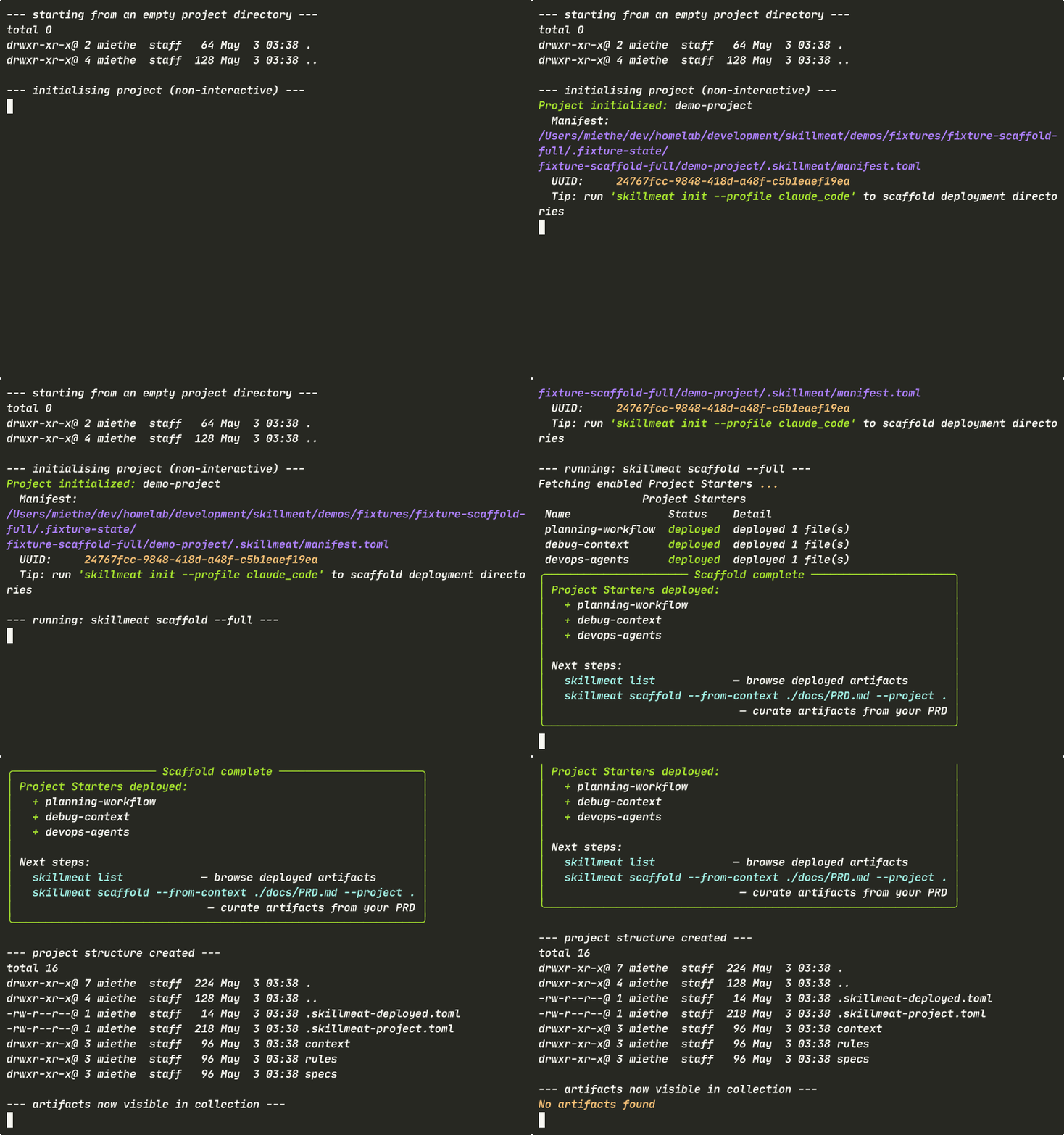
What You'll See
Empty Directory (Baseline)
Start with nothing — no config, no .claude/ directory.
What's happening:
- The target directory is empty — only
.and..entries - This is the true "before" state of any new project
- Establishes the baseline for the time-saving claim
Interactive Init
scaffold --full launches a four-question prompt sequence.
What's happening:
- Prompts: project name, description, target platforms, and whether an existing PRD is available
- If no PRD is provided, a placeholder PRD file is created so the project structure is complete
- Four questions is the entire setup cost — everything else is automated
Project Starters Deployment
After init, enabled Project Starters are fetched from the API and deployed in one pass.
What's happening:
- A progress spinner shows "Fetching enabled Project Starters..."
- A Rich table prints the deployed starters with name, version, and status
- Each starter shows
[green]deployed[/green]with the file count it placed - Starters are pinned, reproducible versions — not "whatever's latest on GitHub"
Completion Summary
A green-bordered Rich panel confirms scaffold completion and prints the next-step command.
What's happening:
- The "Scaffold complete" panel summarizes the deployed starters
- The next-step hint is copy-pastable:
skillmeat scaffold --from-context ./docs/PRD.md - This is the bridge from org-standard setup to PRD-driven artifact curation
Inspecting the Result
Verify the populated project layout and collection state.
What's happening:
.claude/now contains platform configs and the deployed skill/agent directoriesskillmeat listshows the deployed artifacts visible in the active collection- Same directory as Beat 1, now fully wired
Why --full Exists
The flag bundles the steps you'd otherwise run manually:
| Manual step | What --full does |
|---|---|
skillmeat init (interactive) |
Asks the same four questions |
skillmeat scaffold-templates list --kind=project_starter |
Fetches enabled starters from the API |
skillmeat deploy <starter> per starter |
Deploys each starter with pinned versions |
| Hand-write a placeholder PRD | Creates docs/PRD.md if no spec is provided |
One command instead of four. Idempotent: re-running --full is safe — already-deployed starters are skipped.
Key Takeaways
- One command: From empty directory to populated
.claude/in a single guided flow - Org-configured: Starters come from your admin's enabled set — no manual selection required
- Idempotent: Safe to re-run; deployed starters are skipped, not duplicated
- Pinned versions: Every starter is locked to a concrete version, reproducible across the team
- Bridge to PRD curation: The next-step hint points at
--from-contextfor project-specific artifact selection
Common Flags
| Flag | Purpose |
|---|---|
--full |
Bundle init + Project Starters deployment |
--no-input |
Non-interactive mode (uses defaults; safe for CI) |
--project <path> |
Target project directory (defaults to current) |
--collection <name> |
Source collection (default: active) |
Next Steps
- Once scaffolded, run scaffold from PRD to layer project-specific artifacts on top
- Learn how to deploy more artifacts into the project
- Configure your org's Project Starters via the scaffold templates admin guide