Scaffold Project (CLI)
See how to bootstrap a new project from a PRD or README. SkillMeat analyzes your documentation, selects matching artifacts, and generates a ready-to-use .claude/ directory.
About This Demo
Duration: ~60 seconds
Audience: Developers starting new projects
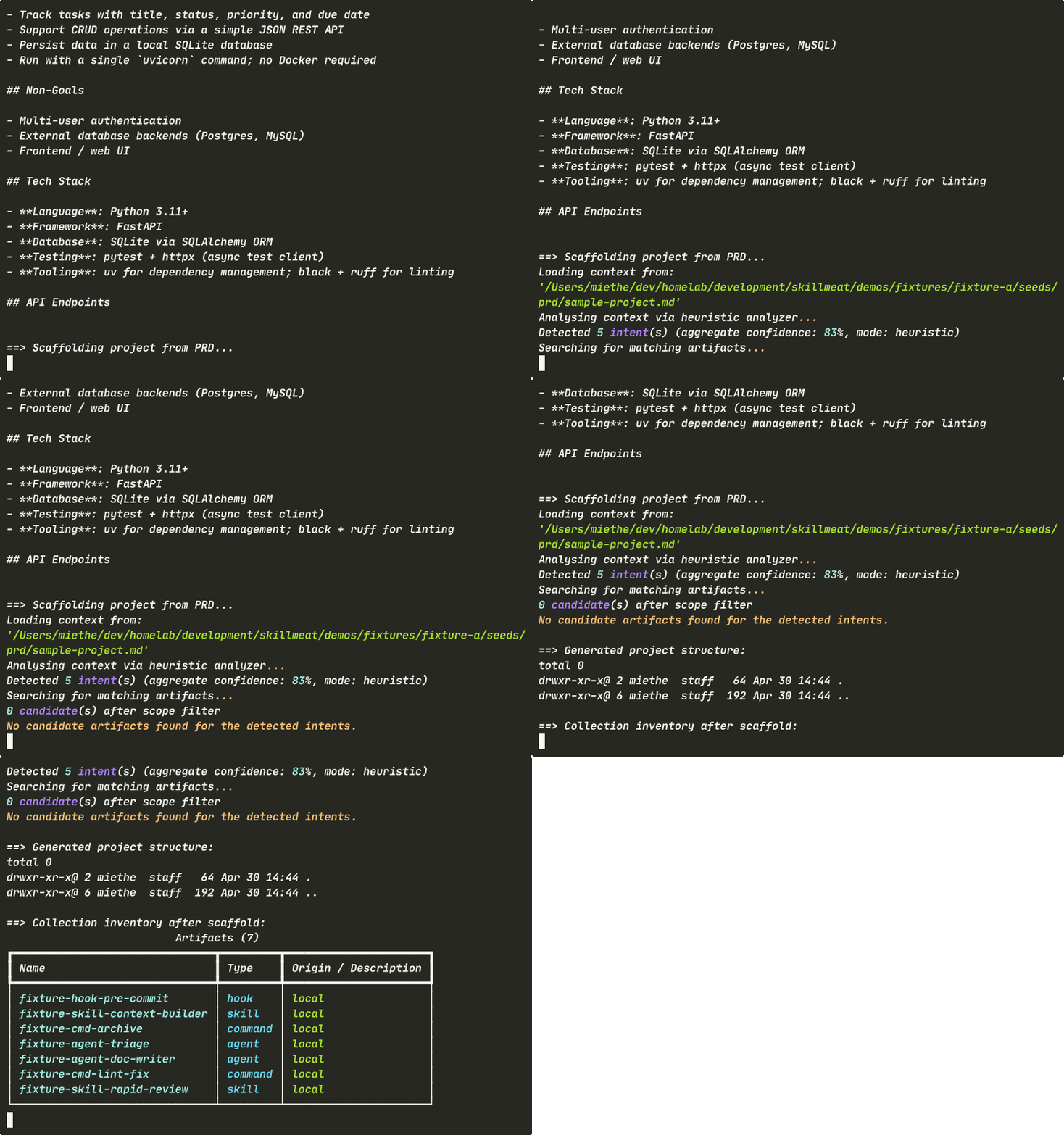
What you'll see: PRD analysis, scaffolding, generated project structure, and collection integrity
What You'll See
The Source: Your PRD
Start with a plain Markdown PRD describing your project goals and tech stack.
What's happening: - SkillMeat reads plain Markdown — no special schema needed - The PRD includes title, goals, and explicit tech stack (FastAPI, SQLite, pytest) - This is all the scaffolder needs to detect patterns and select artifacts
Running the Scaffolder
One command analyzes your PRD and generates the project structure.
skillmeat scaffold \
  --from-context project-prd.md \
  --project ./my-project \
  --auto-confirm \
  --collection my-collection
What's happening:
- --from-context accepts a file path, directory, or free-text description
- --project sets the target; scaffold writes into .claude/ there
- The analyzer detects Python/FastAPI stack from the PRD content
- --auto-confirm makes it non-interactive — safe for CI and reproducibility
Viewing Generated Structure
Check what was created in the project's .claude/ directory.
What's happening:
- .claude/CLAUDE.md is pre-populated with the detected architecture
- Skills, commands, and agents are linked in place — already wired for your stack
- Everything is ready to use immediately
- No manual setup or configuration needed
Collection Remains Unchanged
The scaffolder reads from your collection but doesn't modify it.
What's happening: - Your collection inventory is exactly the same as before scaffold - Scaffold targets the project, not the collection - The same collection can scaffold any number of projects - No side effects — only the project directory is affected
What Scaffold Detects
The analyzer looks for language, framework, and tooling clues:
| Pattern | Detected Framework |
|---|---|
FastAPI, async def, Pydantic |
Python/FastAPI backend |
React, useState, useEffect |
React/TypeScript frontend |
pytest, test_ |
Python testing framework |
jest, describe() |
JavaScript/TypeScript testing |
SQLite, migrations |
Data layer patterns |
Input Formats
The --from-context flag accepts multiple formats:
# From a PRD file
skillmeat scaffold --from-context ./PRD.md --project ./my-project

# From a directory (reads all .md files)
skillmeat scaffold --from-context ./docs --project ./my-project

# From free-text description
skillmeat scaffold --from-context "FastAPI + SQLite backend with pytest" --project ./my-project

# From a remote repo (planned)
skillmeat scaffold --from-context https://github.com/user/repo --project ./my-project
Key Takeaways
- PRD is the source: Plain Markdown — no special schema needed
- Automatic detection: Tech stack is inferred from content
- Non-destructive: Collection is unchanged; only the project is created
- Immediate setup: Generated
.claude/is ready to use right away - Scriptable:
--auto-confirmflag makes it safe for automation
Try It Yourself
# Create a simple PRD
cat > my-prd.md << 'EOF'
# My Task Tracker API

Build a FastAPI backend for task management.

## Stack
- FastAPI for HTTP API
- SQLite for data storage
- pytest for testing

## Features
- CRUD endpoints for tasks
- User authentication
- Rate limiting
EOF

# Scaffold the project
skillmeat scaffold --from-context ./my-prd.md --project ./my-project --auto-confirm

# Check what was generated
ls -la ./my-project/.claude/

# Start building!
cd ./my-project
cat CLAUDE.md
Common Flags
| Flag | Purpose |
|---|---|
--from-context <path/text> |
Source: PRD file, directory, or free text |
--project <path> |
Target project directory |
--collection <name> |
Source collection (default: active) |
--auto-confirm |
Skip confirmations (safe for scripts) |
--no-llm-analyzer |
Use pattern matching only (no LLM) |
Next Steps
- Learn how to deploy more artifacts
- Explore syncing across projects
- See the project setup guide