Push Workflow Artifacts (CLI)
See how to push updated agents, skills, and rules to your SkillMeat collection after modifying your workflow, and verify the changes are stored correctly.
About This Demo
Duration: ~45 seconds
Audience: Developers maintaining Claude Code artifact collections
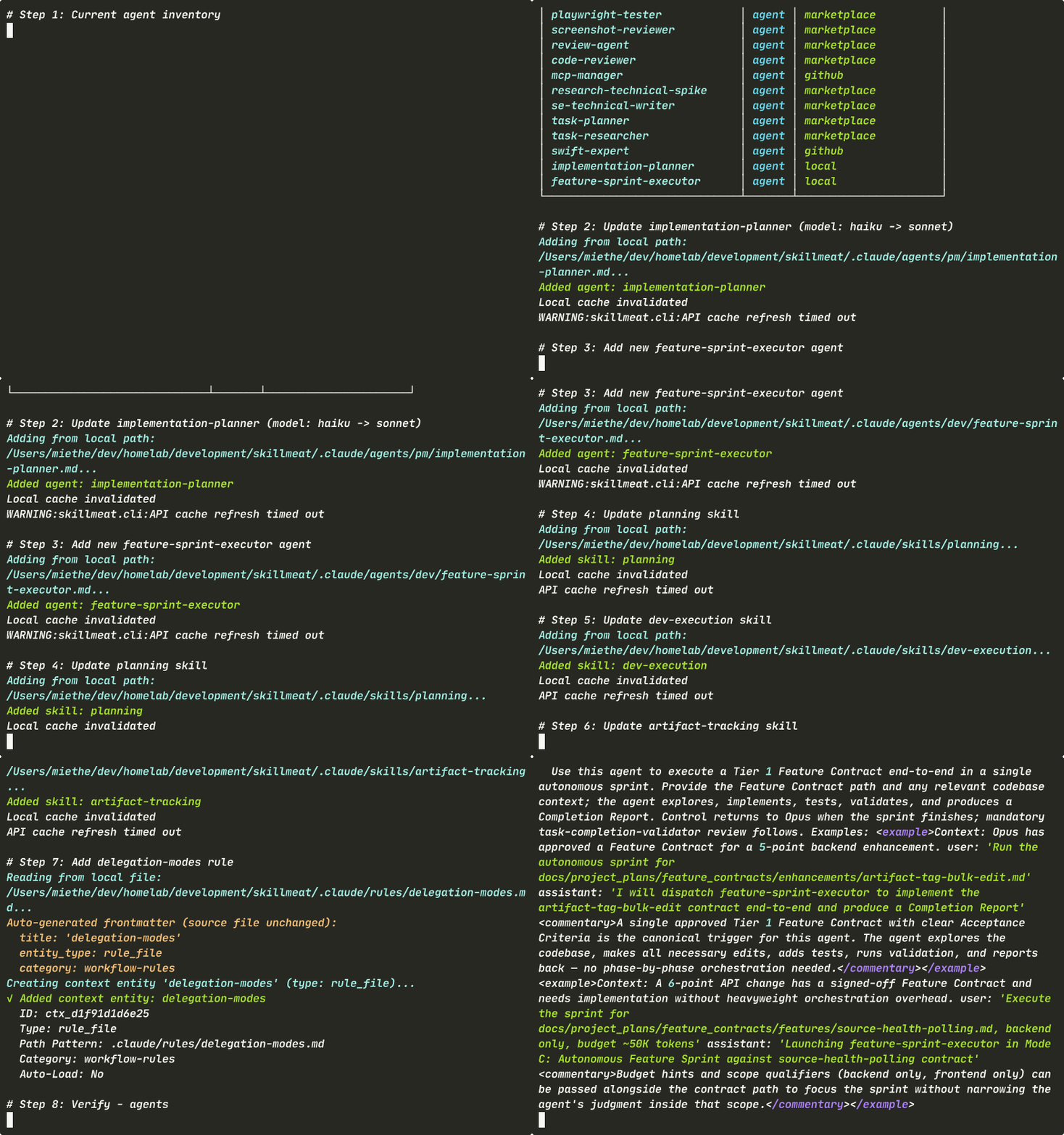
What you'll see: Agent inventory check, updating an agent, adding a new agent, updating skills, adding a rule, verification sweep, inspecting a new agent
What You'll See
Agent Inventory (Before)
Start by reviewing your current agents in the collection.
What's happening:
- The collection displays all available agents, including the current implementation-planner
- --no-cache forces a fresh read from disk, ignoring cached state
- This is your baseline — you'll add and update agents against this
Update an Agent
Replace an existing agent with an updated version.
What's happening:
- --force overwrites the existing agent without confirmation
- The agent is re-indexed immediately; no separate "save" step needed
- In this case, implementation-planner gets a model routing change from haiku to sonnet
- The change is live in your collection after the command completes
Add a New Agent
Introduce a new agent to your collection.
What's happening:
- The new Tier 1 autonomous sprint executor is registered
- No --force needed since it's a new name
- The agent becomes available for deployment to projects immediately
- The collection's agent count increases by one
Update Skills
Push multiple updated skills with one command for each.
skillmeat add skill .claude/skills/planning/planning.md --force
skillmeat add skill .claude/skills/dev-execution/dev-execution.md --force
skillmeat add skill .claude/skills/artifact-tracking/artifact-tracking.md --force
What's happening:
- Each skill gets re-indexed with its new capabilities
- planning adds tier matrix support for autonomous sprint mode
- dev-execution expands to orchestrate feature contracts and sprint workflows
- artifact-tracking gains enhanced inventory management for complex releases
- All three updates happen independently; no inter-skill dependencies
Add a Rule
Register a new workflow rule as a context entity.
What's happening:
- Rules are managed via context add, not the main add command
- --category workflow-rules groups this rule with other workflow governance
- Rules are stored as context entities, separate from agents and skills
- The rule is available for reference and automation immediately
Verification Sweep
Confirm all artifacts landed in the collection.
skillmeat list --type agent --no-cache
skillmeat list --type skill --no-cache
skillmeat context list --category workflow-rules
What's happening:
- Agent list now includes the new feature-sprint-executor
- Skill list shows updated timestamps for planning, dev-execution, and artifact-tracking
- Context list displays the new delegation-modes rule under workflow-rules
- All artifacts are indexed and ready for deployment
Inspect New Agent
View details of the newly added agent.
What's happening: - The agent's metadata displays: name, type, capabilities, and usage - The description explains when and how to use the agent - Example usage patterns show integration points with other artifacts - Ready for deployment to projects that need autonomous sprint execution
Add vs. Update
Both operations use the same add command, but they behave differently:
| Operation | What It Does | When to Use |
|---|---|---|
| add (new artifact) | Register a new artifact in the collection | Adding agents, skills, or rules for the first time |
| add --force (existing) | Overwrite an existing artifact in the collection | Updating after code changes or capability improvements |
Use --force to avoid prompts when updating; omit it for new artifacts.
Key Takeaways
add agent/skill --forcefor updating existing artifacts (idempotent)context addfor rules and other context entities (separate from main artifact storage)--no-cacheforces fresh reads from disk, useful after batch updates--dangerously-skip-permissionsfor non-interactive/scripted runs- Verification uses
listfor agents/skills butcontext listfor context entities
Try It Yourself
# Check your current agent inventory
skillmeat list --type agent

# Update an existing agent with new capabilities
skillmeat add agent ./path/to/agent.md --force

# Add a new agent
skillmeat add agent ./path/to/new-agent.md

# Update multiple skills at once
skillmeat add skill ./path/to/skill-1.md --force
skillmeat add skill ./path/to/skill-2.md --force

# Register a new rule
skillmeat context add ./path/to/rule.md --category workflow-rules

# Verify everything is indexed
skillmeat list --type agent --no-cache
skillmeat list --type skill --no-cache
skillmeat context list --category workflow-rules

# Inspect the new agent
skillmeat show <agent-name>
Common Flags
| Flag | Purpose |
|---|---|
--force |
Overwrite without confirmation (idempotent for updates) |
--no-cache |
Force fresh read from disk, ignore cached state |
--dangerously-skip-permissions |
Skip permission validation in non-interactive environments |
--category <name> |
Organize context entities by category (rules, templates, etc.) |
--type <type> |
Filter list output by artifact type (agent, skill, command, etc.) |
Next Steps
- Learn how to deploy updated artifacts to projects
- Explore syncing across projects to check for drift after updates
- See the CLI reference for all available commands